
To generate a QR code online free, open a browser-based generator, type your text or URL, pick a size, and click generate — the tool draws the QR code instantly and lets you download it as a PNG. ToolHost’s free QR Generator does exactly this: everything happens on your own device, nothing is uploaded, and there is no sign-up or software to install.
How to Generate a QR Code Online, Step by Step
- Open the free QR Generator. It runs entirely in your browser.
- Type what you want the code to contain. The box accepts anything: a website URL, a message, contact details, or the WiFi login format described below.
- Pick a size. Small (200×200) suits screens, Medium (300×300, the default) is the all-rounder, and Large (400×400) is best for printing.
- Click “Generate QR Code”, then “Download PNG”. The code appears instantly and downloads as an image file you can share or print.
That is the whole process. The generation is done by JavaScript running in your own browser — the text you enter is never transmitted to a server.
How to Make a WiFi QR Code (Share Your WiFi Without Typing the Password)
Guests at your home or customers at your shop should not have to type a long password. A WiFi QR code lets them join by pointing their phone camera at a printed code — the phone reads the network name and password straight from the code.
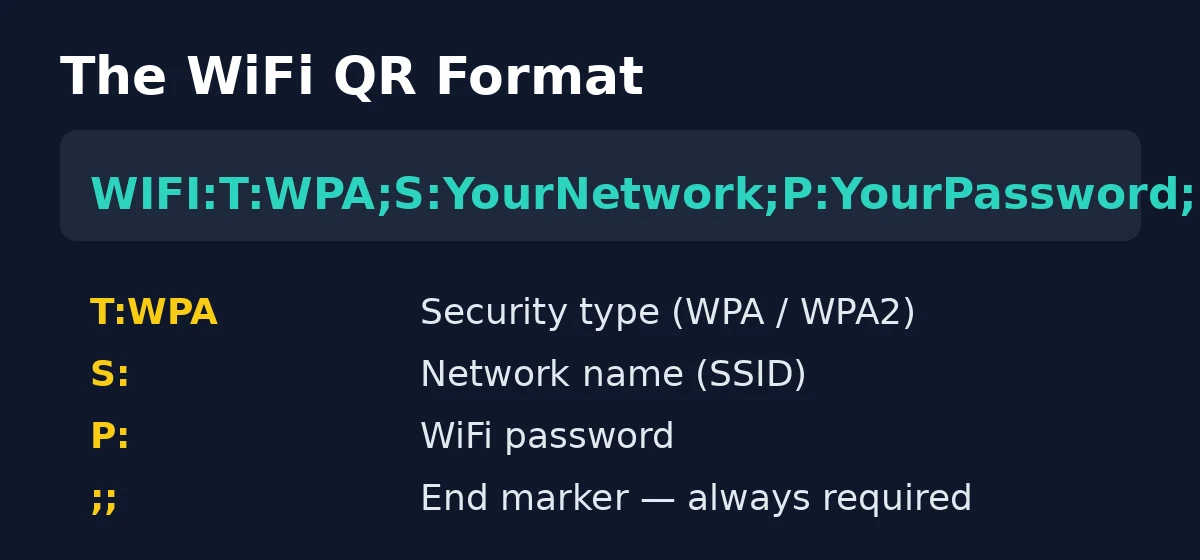
This tool has no dedicated “WiFi mode” with SSID and password fields, but WiFi codes work anyway: WiFi logins are just a standard text format that every phone’s camera understands. Type this exact format into the tool’s text box, replacing the example values with your own:
WIFI:T:WPA;S:YourNetworkName;P:YourPassword;;Each part of the format means something specific:
| Part | Meaning | Example |
|---|---|---|
T:WPA | Security type — WPA for WPA/WPA2 networks | T:WPA2 for WPA2-only networks |
S: | Your network name (SSID), exactly as the router broadcasts it | S:CafeDowntown |
P: | The WiFi password | P:coffee2026 |
;; | End marker — always close with a double semicolon | Required |
H:true | Optional — add before the end marker if your network is hidden | H:true;; |
For an open network with no password, use T:nopass and leave the password empty: WIFI:T:nopass;S:GuestWiFi;;. If your network name or password contains a semicolon, comma or backslash, put a backslash in front of it (for example, P:pass\;word).
Important last step: after generating, scan the code with your own phone before printing it. If your phone offers to join the network, the code is correct.
What Can You Put Inside a QR Code?
Almost any short text. QR codes (short for Quick Response codes, invented in the 1990s and documented on Wikipedia) simply encode characters — the phone decides what to do with them:
- Website links — on flyers, posters, business cards and product packaging, a code sends the scanner straight to your page. For very long URLs, shorten or encode them first with our URL Encoder guide, since shorter text makes more reliable codes.
- WiFi logins — the format above, ideal for guests, cafés and offices.
- Plain text and contact details — a short message, a phone number, or a vCard-style contact block.
- Event tickets and badges — a code per attendee that a scanner app can read at the door.
Two technical limits are worth knowing. A single code holds roughly a few thousand characters — very long text may simply fail to generate, so link to a page instead of stuffing paragraphs into the code. And this tool creates codes at a medium error-correction level, which means part of a printed code can be smudged or damaged and still scan — handy for packaging and outdoor posters.
Which Size Should You Choose?
| Size | Best for | Notes |
|---|---|---|
| Small — 200×200 | On-screen use: emails, chat messages, web pages | Too small for most printing |
| Medium — 300×300 | The safe default: documents, handouts, small stickers | Scans reliably at arm’s length |
| Large — 400×400 | Posters, flyers, shop windows | Keep a clear quiet zone (white margin) around the code |
Rule of thumb for print: the farther away someone will stand when scanning, the bigger the code must be — and always do one test scan of the final printed size before running a whole batch.
What This Tool Does Not Do (Honest Limitations)
- No logo overlay. Some paid QR services place your logo in the code’s center. This tool does not — the output is a clean standard code. If brand-marked codes are a must, look for a service that explicitly offers center-logo placement and test that the result still scans.
- No WiFi preset fields. As shown above, WiFi codes work by typing the format string manually — there is no form with SSID/password boxes.
- No dynamic codes or scan analytics. The code is static: it always points to exactly what you typed. It cannot be edited later, and nobody counts how many people scan it. That is also the privacy upside — no account, no tracking.
How the Options Compare
| Option | Files/text uploaded? | Account needed | Cost | Best for |
|---|---|---|---|---|
| Browser-based generator (this tool) | No — stays on your device | No | Free | Quick static codes, WiFi sharing, print |
| Big QR websites | Yes — your content goes to their servers | Usually | Free tier, then paid | Dynamic editable codes, scan statistics |
| Design/print software | No | Varies | Mostly paid | Logo-embedded codes inside a full layout |
Frequently Asked Questions
Is it safe to put my WiFi password in a QR code? Anyone who can see the printed code can read the password with a scanner app, so treat a WiFi QR like the password itself — keep it where guests can see it but strangers cannot.
Do QR codes expire? Static codes like the ones this tool makes never expire — they encode your text directly. Only “dynamic” codes from paid services can stop working, because those route through the provider’s servers.
Will the QR code work if I print it in black and white? Yes. QR codes are designed as black-on-white patterns, and standard printing is exactly what they are made for.
Can I put my logo in the middle of the QR code? Not with this tool. If you need that, use a service built for logo placement — and always test-scan the result, since covering too much of the pattern breaks it.
Why did my very long text fail to generate? QR codes have a capacity limit of a few thousand characters. Put the content on a web page and encode the short link instead — the URL Encoder guide shows how to prepare long URLs for exactly this.
Generate Your QR Code Now
You now know the three-step process, the WiFi login format, and which size fits your use. Open the free QR Generator, type your text or WiFi string, and download your PNG — in seconds, without uploading anything.