
To create an unbreakable password, use a generator that picks random characters for you: set a long length, keep all character types switched on, and copy the result. ToolHost’s free Password Generator does exactly this in your browser — nothing is sent anywhere, nothing is stored, and there is no sign-up.
How to Generate a Strong Password, Step by Step
- Open the free Password Generator.
- Set the length with the slider. It runs from 6 to 64 characters; 16 is the default and a solid choice for most accounts.
- Keep all four character types switched on. Uppercase (A–Z), lowercase (a–z), numbers (0–9) and symbols are all enabled by default — leave them that way.
- Click “Generate Password”. One password appears, with an estimated-strength label such as “Strong (16 characters, 4 character types)”.
- Click “Copy” and paste it where you need it.
That is the whole process. The tool generates one password at a time, entirely on your device.
What Actually Makes a Password Strong?
Length beats cleverness. Password strength is a math problem: the more characters and the more character types, the more combinations an attacker must try. Security researchers call this entropy, and Wikipedia’s overview of password strength explains the concept in depth. The rough scale looks like this:
| Password | Possible combinations | Verdict |
|---|---|---|
| 8 characters, letters only | ~50 trillion | Weak — guessable in minutes on modern hardware |
| 12 characters, letters + numbers | ~3 sextillion | Decent, but patterns weaken it |
| 16 characters, all four types | ~4 × 10³¹ (a 4 followed by 31 zeros) | Strong — effectively unguessable by brute force |
| 20+ characters, all four types | Astronomically larger | Stronger than you will ever need |
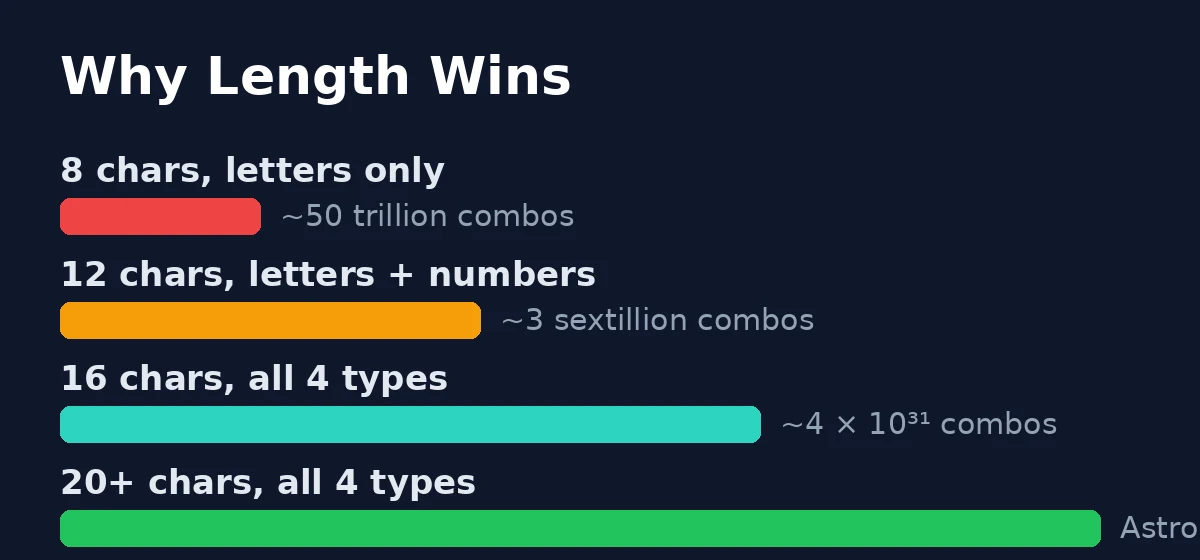
The practical takeaway: moving from 8 to 16 characters matters far more than swapping a letter for a symbol in a short password. This is why the tool defaults to 16 characters with every character type on.
Why a Generator Beats Your Own Ideas
Human brains are predictable, and attackers know it. The most common real-world attacks do not try every combination — they try the things people actually do:
- Dictionary attacks try words, names, dates and common substitutions (“P@ssw0rd2024” is in every attacker’s list).
- Credential stuffing takes passwords leaked from one site breach and tries them on other sites — which is why reusing one “clever” password everywhere is the single most dangerous habit.
- Pattern guessing exploits the way people construct passwords: a capital first, a number at the end, a symbol tacked on.
A generator has none of these habits. According to the tool page’s own documentation, it draws from your browser’s built-in crypto.getRandomValues() function — the operating system’s secure randomness source — rather than the ordinary Math.random(), which the page correctly notes is statistically predictable and not intended for anything security-sensitive. Every character is an independent random pick, so there is no pattern to learn.
Is It Safe to Generate Passwords Online?
With this Password Generator, yes — and the reason is architectural, not a promise. The password is generated entirely in your browser using your device’s own secure randomness; the page states that no network request is made when generating a password and that the tool does not save anything itself. Your password never leaves your device because there is nowhere for it to go — there is no server involved in the process at all.
This is the same privacy model as the rest of ToolHost’s browser-based tools: your data stays yours. The one thing the tool cannot do for you is remember the password — write it down in a safe place or use a password manager (more on that below).
Honest Limitations You Should Know
- No “exclude ambiguous characters” toggle. The tool has no option to skip lookalikes such as
0/Oorl/1— if you must read a password aloud over the phone, double-check those characters. - One password at a time. There is no batch mode; each click produces a single password with its own Copy button.
- It is not a password manager. A generator creates strong passwords; a manager stores them, fills them in, and syncs them across your devices. For the dozen-plus accounts most people carry, a reputable password manager is the better long-term home for what this tool creates. Think of this tool as the best place to make a password, and a manager as the best place to keep it.
How the Options Compare
| Option | Cost | Account needed | Your password leaves your device? | Best for |
|---|---|---|---|---|
| Browser-based generator (this tool) | Free | No | No | One-off strong passwords, right now |
| Browser/OS built-in generators | Free | Browser/OS account | Stays in your ecosystem | Quick passwords saved in the browser |
| Password managers | Free tiers + paid | Yes | Encrypted sync by design | Storing and filling passwords daily |
Frequently Asked Questions
How long should my password be? 16 characters with all character types is the sweet spot for most accounts — that is the tool’s default for a reason. Go to 20+ for the accounts that matter most, like your email and banking.
Are password generators safe to use? Ones that run entirely in your browser, like this Password Generator, are — your password is created on your device and never transmitted. Avoid any “generator” that asks you to create an account first or emails you the result.
Should I use the same strong password everywhere? No — never. A strong password used on ten sites fails the moment one of those sites is breached. Generate a unique password per important account; that is exactly what a password manager is for.
Do I need symbols in my password? They help, but length helps more. A 16-character password with all four types on — the tool’s default — is already in the effectively-unguessable range.
What if a site does not allow symbols? Uncheck the Symbols box and add a few extra characters of length to compensate. The strength indicator updates so you can see the trade-off.
Generate Your Strong Password Now
You now know why length wins, why random beats clever, and why a browser-only tool keeps your password private. Open the free Password Generator, keep the defaults or stretch the slider, and copy a password no attacker can guess — in seconds.