
A CSS gradient is a smooth transition between two or more colors that the browser draws itself using CSS — no image file is needed. One line of CSS, background: linear-gradient(to right, #6366f1, #3b82f6);, paints the exact same background that would take a full-HD image file of 8,729 bytes — and the CSS version is just 56 bytes, 99.4% smaller, with zero extra HTTP requests.
This guide explains how CSS gradients work, when to use linear and radial gradients, and how to build one in seconds with a free CSS gradient generator — no code writing required.
Why Use CSS Instead of a Gradient Image?
A gradient image is a fixed file: it has a set size, it downloads separately, and it can look blurry when stretched beyond its original dimensions. A CSS gradient is an instruction the browser renders at paint time, so it behaves very differently.
We measured both approaches with the identical two-color gradient (indigo #6366f1 to blue #3b82f6) at 1920×1080:
| Method | Size | Extra request? | Scales to any screen? |
|---|---|---|---|
CSS linear-gradient() | 56 bytes | No — it lives in your stylesheet | Yes, rendered fresh at any size |
| PNG image (1920×1080) | 8,729 bytes | Yes, one HTTP request | No, fixed resolution |
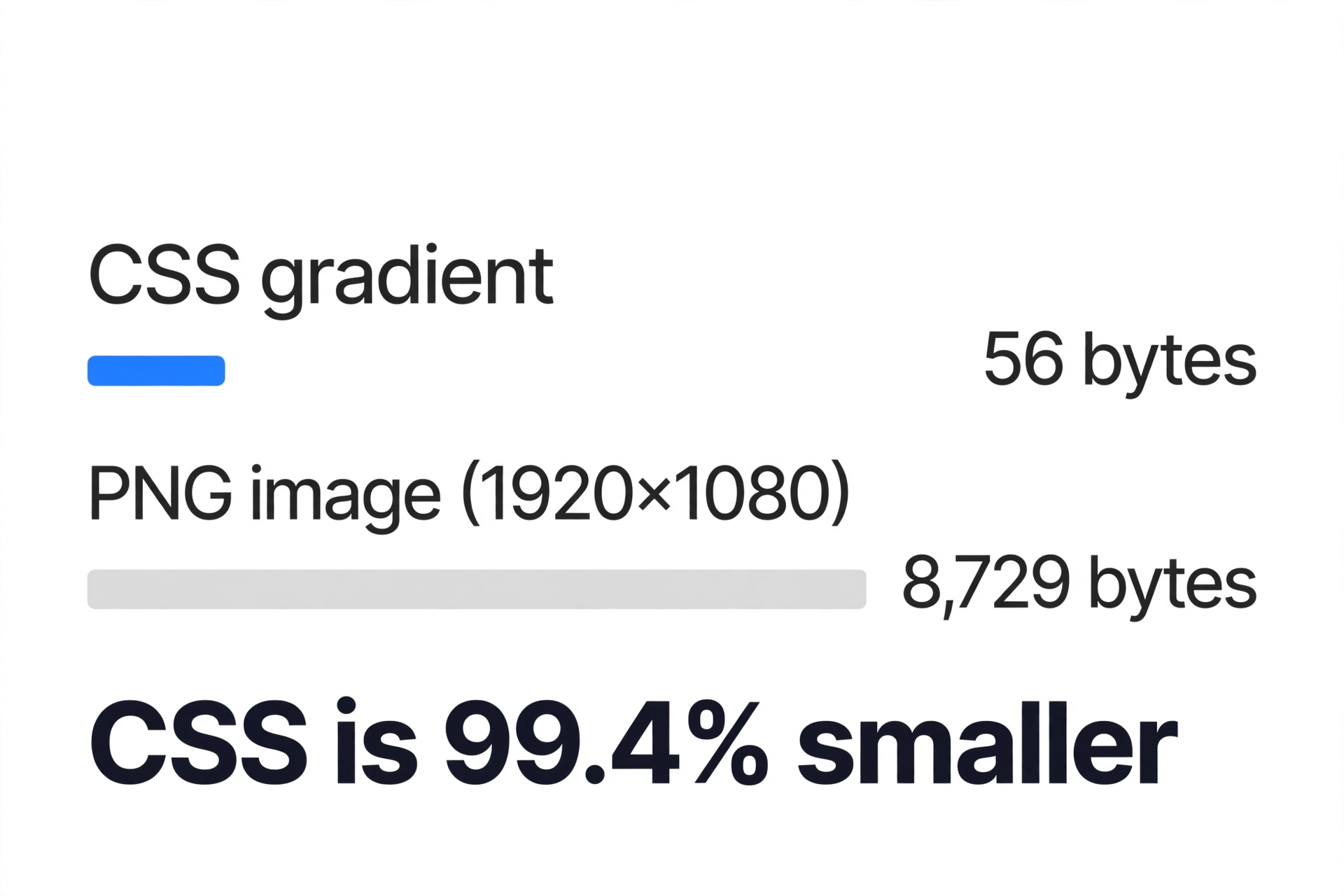
Three facts follow from that measurement. First, the CSS version is about 155 times smaller. Second, it adds no network request at all, because the code travels inside a stylesheet the page already loads. Third, the browser renders gradients on the GPU at whatever size the element happens to be, so the result stays perfectly smooth on a phone screen and on a 4K monitor alike.
Rule of thumb: if a background is just colors blending into each other, it should be CSS, not an image.
Linear vs Radial Gradients: What Is the Difference?
CSS offers two main gradient types, and choosing between them is simply a question of how the colors should flow.
| Linear gradient | Radial gradient | |
|---|---|---|
| Color flow | In a straight line | Outward from a center point |
| CSS function | linear-gradient() | radial-gradient() |
| Direction control | Keyword (to right) or angle (90deg) | Shape and position (circle at center) |
| Best for | Page backgrounds, buttons, banners, overlays | Spotlights, glows, vignettes, highlights |
A linear gradient moves along a straight axis. You control the direction with a keyword or an angle: 0deg points to the top, 90deg to the right, 180deg to the bottom, and 270deg to the left; if you give no direction, the gradient runs top to bottom by default.
A radial gradient spreads outward from a center point, like light from a bulb. It is the right choice when you want a soft glow behind a headline, a spotlight on a product, or a gentle vignette at the edges of a hero section.
A third type, conic-gradient(), sweeps colors around a center point like slices of a pie. It is newer than the other two, so check your target browsers before relying on it — linear and radial gradients are the safe, universally supported pair.
How to Create a Gradient with the CSS Gradient Generator
The free CSS gradient generator on ToolHost builds the gradient visually and writes the code for you. It runs entirely in your browser — nothing you pick is uploaded or stored.
- Choose the type and direction. Pick linear or radial, then choose a direction for linear gradients (for example, left to right). The preview updates instantly.
- Pick your two colors. Select the start and end colors and watch the blend change in real time until it looks right.
- Copy the CSS. The generator outputs ready-to-paste code. Drop it into your stylesheet as the element’s
background, and you are done.
That is the whole workflow — design visually, paste once. If you later want more than two colors, add them by hand as extra comma-separated color stops in the same line of code, as shown next.
CSS Gradient Syntax, Explained
Every gradient is a list of color stops — a color, optionally followed by the position where that color should be fully reached. Positions are percentages along the gradient’s axis.
A basic two-color linear gradient:
background: linear-gradient(to right, #6366f1, #3b82f6);The same idea with an angle and three colors — note how the middle color is pinned at 50%:
background: linear-gradient(45deg, #ef4444 0%, #f59e0b 50%, #3b82f6 100%);A radial gradient with an explicit shape and position:
background: radial-gradient(circle at center, #ffffff, #3b82f6);Two syntax details are worth knowing. First, if a color stop has no position, the browser places it halfway between its neighbors, which is why the simple two-color version blends evenly. Second, putting two stops at the same position creates a hard edge instead of a blend — linear-gradient(to right, red 50%, blue 50%) gives you two solid halves with no transition. That trick is the basis of many CSS patterns and flags.
The full formal syntax is documented in MDN’s reference for linear-gradient(), including corner directions such as to bottom right.
How Do You Make Gradient Text in CSS?
Gradient text — letters filled with a color blend instead of a flat color — is one of the most searched-for gradient effects, and it is done with plain CSS. It is a hand-written technique rather than a generator feature, and it takes three declarations:
.gradient-text {
  background: linear-gradient(to right, #6366f1, #3b82f6);
  -webkit-background-clip: text;
  color: transparent;
}
Here is what each line does. The background paints the gradient across the whole element, exactly as before. -webkit-background-clip: text then clips that background so it only shows through the shape of the letters. Finally, color: transparent makes the actual text color invisible so the gradient underneath shows through. The -webkit- prefix is still required for this property in practice, even in browsers that are not WebKit-based — write it exactly as shown.
Use gradient text sparingly: headlines and logos wear it well, but body text should stay a solid, high-contrast color.
Stripes and Patterns with Repeating Gradients
When a gradient’s color stops repeat at fixed intervals, use the repeating variants: repeating-linear-gradient() and repeating-radial-gradient(). They tile the stop pattern until the element is filled, which makes crisp stripes with no image:
background: repeating-linear-gradient(45deg, #3b82f6 0 16px, #1d4ed8 16px 32px);Combined with the hard-stop trick from the syntax section, repeating gradients can produce stripes, checkerboards and warning tapes in a few lines of CSS.
Gradients and Text Readability
A beautiful gradient can quietly ruin a page if text sits on top of it: the words may cross a light patch and become unreadable. Two fixes cover almost every case.
- Darken behind the text. Layer a semi-transparent black gradient over your photo or colored gradient — for example
linear-gradient(rgba(0,0,0,0.55), rgba(0,0,0,0.55))as the first background layer — so white text keeps a dark backdrop everywhere. - Check the contrast ratio. The WCAG standard requires at least 4.5:1 contrast for normal text (AA level). Run your text and background colors through a contrast checker and read our complete WCAG contrast guide if you want the full rules — ratios, large-text exceptions and AAA levels.
Minify Your Gradient CSS Before You Ship It
Gradients are already tiny, but a stylesheet full of them still benefits from cleanup: removing comments, spaces and line breaks typically shrinks a CSS file by 15–35%. Paste your final stylesheet into the free CSS Minifier and follow the process in our CSS Minifier guide — one pass, in your browser, and your production CSS is as lean as your gradients.
Frequently Asked Questions
Can a CSS gradient have more than two colors?
Yes. A gradient accepts any number of color stops — simply list more colors, separated by commas, and add a percentage position to control where each one peaks, like linear-gradient(to right, red 0%, yellow 50%, blue 100%). The ToolHost generator creates two-color gradients; extra stops are added by editing the copied code.
Do CSS gradients work in all browsers?
Linear and radial gradients are supported in all modern browsers without any vendor prefixes; prefixes were only needed for much older browsers. Conic gradients are newer, so verify support for your audience before using them in production.
Is my data saved when I use the gradient generator?
No. The ToolHost CSS gradient generator runs entirely in your browser with JavaScript. Your color choices are never uploaded, stored or transmitted — close the tab and nothing remains.
Which is better, a linear or a radial gradient?
Neither is better in general — they solve different shapes. Choose linear for directional blends across backgrounds, buttons and banners; choose radial when the effect radiates from a point, such as a glow, spotlight or vignette.
Why is a CSS gradient better than a gradient image?
Because it is dramatically smaller and resolution-independent. In our measurement, the same 1920×1080 gradient took 56 bytes as CSS versus 8,729 bytes as a PNG — 99.4% smaller — and the CSS needs no extra download and never blurs when scaled.
Build Your Gradient Now
Pick a direction, blend two colors, copy one line of CSS — that is all a professional gradient takes. Open the CSS gradient generator and create yours free, right in your browser.