
A hex color code is a way of writing a color as a # sign followed by six hexadecimal digits — for example #FF5733, a coral red. HEX, RGB and HSL are three notations for exactly the same colors: HEX writes the red, green and blue channels in base 16, RGB writes them in decimal from 0 to 255, and HSL describes the color by hue, saturation and lightness instead. ToolHost’s free Color Picker shows all three formats at once, updating live as you pick a color.
What Is a HEX Color Code?
A HEX color code is six hexadecimal digits split into three pairs, one pair per RGB channel: red, green, blue. Each pair runs from 00 (no intensity) to FF (full intensity, 255 in decimal). FF is simply how 255 is written in base 16.
Take #FF5733 apart: FF = 255 red, 57 = 87 green, 33 = 51 blue — full red, medium green, a little blue, which mixes to coral. With 256 possible values per channel, HEX can name 256 × 256 × 256 = 16,777,216 colors.
When each pair happens to use the same digit twice, a three-digit shorthand works: #F00 is #FF0000 (pure red), and #FFF is white. The history and naming of web colors are covered in Wikipedia’s article on web colors.
What Is RGB?
RGB describes a color by how much red, green and blue light it contains, each channel a number from 0 to 255: rgb(255, 87, 51) is the exact same coral as #FF5733. Screens create color by mixing light, so RGB matches the hardware directly — which is why canvas graphics, image processing and most programming APIs work in RGB values.
What Is HSL?
HSL describes a color the way people think about it: hue (which color, an angle from 0° to 360° on the color wheel — 0° is red, 120° is green, 240° is blue), saturation (how vivid it is, 0% grey to 100% full color) and lightness (0% black, 50% the pure hue, 100% white). The same coral is hsl(11, 100%, 60%) — a hue just past red, fully saturated, slightly lightened.
HSL’s superpower is shades: keep hue and saturation fixed and change only lightness to get a whole family of matching colors. No other format makes that a one-number change.
HEX to RGB to HSL: A Verified Conversion Table
Every row below is the same color written three ways — convert any of them yourself in the Color Picker and you will get identical results.
| Color | HEX | RGB | HSL |
|---|---|---|---|
| Coral red | #FF5733 | rgb(255, 87, 51) | hsl(11, 100%, 60%) |
| Blue | #3B82F6 | rgb(59, 130, 246) | hsl(217, 91%, 60%) |
| Green | #22C55E | rgb(34, 197, 94) | hsl(142, 71%, 45%) |
| Yellow | #FACC15 | rgb(250, 204, 21) | hsl(48, 96%, 53%) |
| Indigo | #6366F1 | rgb(99, 102, 241) | hsl(239, 84%, 67%) |
| Deep navy | #2D3559 | rgb(45, 53, 89) | hsl(229, 33%, 26%) |
| Mid grey | #808080 | rgb(128, 128, 128) | hsl(0, 0%, 50%) |
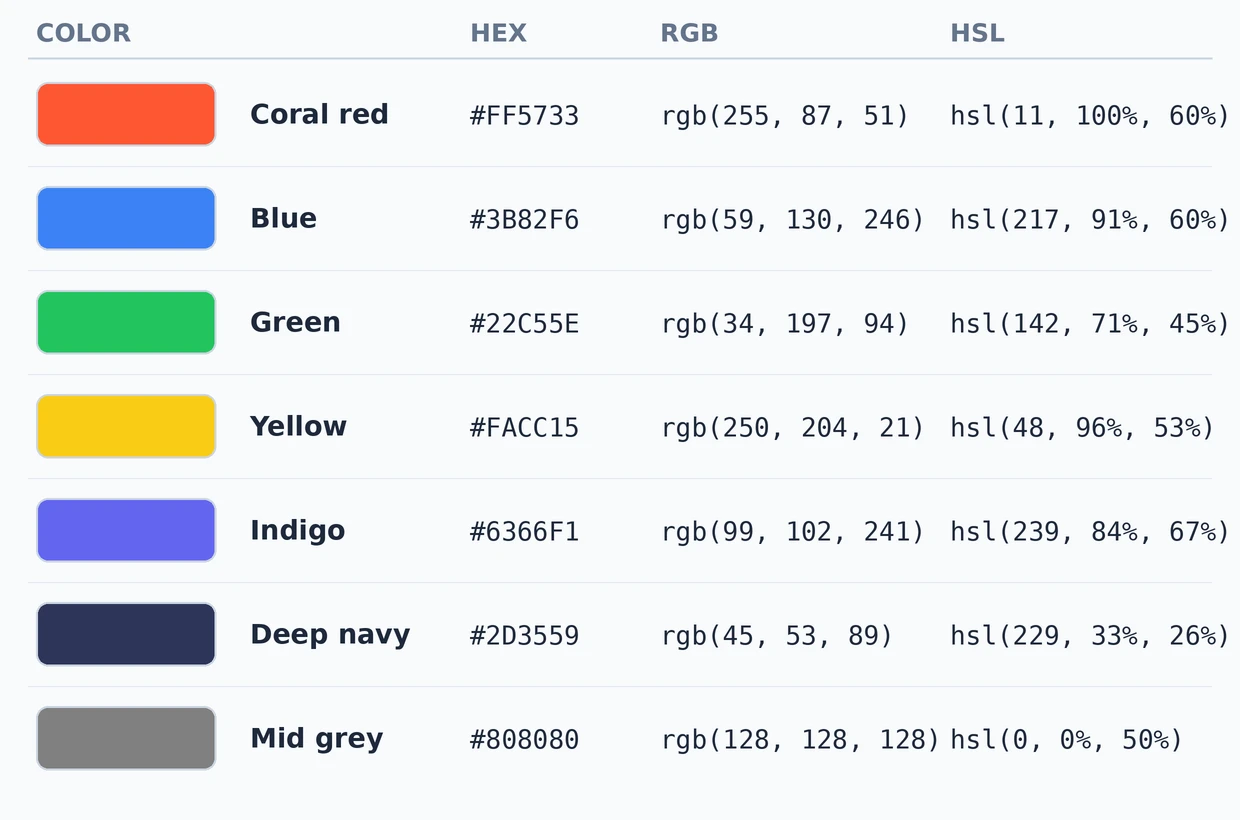
Notice the grey row: saturation 0% means no hue at all, and 50% lightness gives exactly mid grey. That is HSL logic working exactly as advertised.
How Can You Read a Color Code at a Glance?
With a little practice you can guess a color from its code without any tool:
- All three pairs low (like
#1A1A2E) → a dark color. All three high (like#F5F5F0) → a near-white. - One pair clearly highest → the color leans that way:
#B03A2Eis red-dominant,#1F618Dis blue-dominant. - All three pairs equal (like
#808080) → a pure grey with no hue at all. - In HSL, the hue number alone names the family: 0° red, 60° yellow, 120° green, 180° cyan, 240° blue, 300° magenta — and every color in between blends its two neighbours.
How Do You Convert a Color Between Formats?
Type or pick the color once in the free Color Picker — it displays the HEX, RGB and HSL values together and updates all three live as you adjust the color, with a preview swatch so you always see what you are copying. There is no form to submit and nothing leaves your browser; the picker’s own starting color, deep navy #2D3559, appears in the table above.
How Does Transparency (Alpha) Work in Each Format?
All three formats can carry an alpha value — how opaque the color is:
- HEX: add a fourth pair for alpha.
#3B82F680is the blue above at about 50% opacity, because80in hex is 128 out of 255. - RGB:
rgba(59, 130, 246, 0.5)— alpha as a decimal from 0 (invisible) to 1 (solid). The modern space-separated formrgb(59 130 246 / 0.5)means the same thing. - HSL:
hsla(217, 91%, 60%, 0.5), or modernhsl(217 91% 60% / 0.5).
Alpha is what makes shadows soft — the CSS box-shadow guide uses rgba() colors for every realistic shadow example for exactly this reason.
HEX vs RGB vs HSL: When Should You Use Each One?
| Format | Use it when |
|---|---|
| HEX | Writing CSS and design handoffs — it is the most compact and the most widely used in stylesheets |
| RGB | Working in code that manipulates channels — canvas, image filters, generated graphics — or whenever you need alpha via rgba() |
| HSL | Building shade families, themes and design systems — vary lightness to get hover states and tints that always match |
Whichever format you choose, the color still has to work where you put it: a light text color on a light background fails readability in every notation. Check real pairings against the WCAG ratios in our contrast checker guide before you ship them, build gradients from them with the CSS gradient guide, and if you are choosing colors for yourself rather than a screen, our guide to the colors that suit you best covers the personal side of the same subject.
Frequently Asked Questions
How many colors can a hex code make?
16,777,216 — each of the three channels has 256 values (00 to FF), and 256 × 256 × 256 = 16,777,216.
Is #FFF the same color as #FFFFFF?
Yes. The three-digit shorthand doubles each digit, so #FFF expands to #FFFFFF (white) and #F00 to #FF0000 (red).
What does FF mean in a hex color code?
FF is 255 written in hexadecimal — the maximum intensity for that channel. A code starting with FF has full red.
Can HSL make every color RGB can?
Yes. HEX, RGB and HSL are three coordinate systems for the same sRGB color space, so any color in one format exists in the other two.
Which color format is best for CSS?
HEX is the most common choice for static colors because it is the shortest. Switch to HSL whenever you need shades of the same hue, and to rgba() whenever you need transparency.
Pick a Color and Get Every Format at Once
You now know how to read all three formats, how alpha works in each, and which one fits which job. Open the free Color Picker, find the color you want visually, and copy it in whichever format your project needs — all three are always on screen together.